📖 README





e2e
e2e is an end-to-end testing framework for web and mobile apps. Describe a goal in natural language and an agent drives the app to reach it. Check the result with locators and assertions in the same test.
// tests/checkout.e2e.ts
import { test, expect } from 'e2e';

test('a member upgrades to Pro', async ({ app, agent, screen }) => {
  await app.open('/settings/billing');

  await agent.act('upgrade the workspace to the Pro plan');
  await agent.assert('the invoice preview shows a prorated amount');

  await expect(screen.getByRole('status')).toContainText('Pro');
});
An agent step that a later assertion verifies records its actions, and the
next run replays them with no model calls until the app changes. Tests
without agent steps need no model. Bring your own subscription, API key, or
local model.
Quick start
npx e2e init
init asks for an engine, web or mobile, and a model provider, then writes a
config and an example test. The
quickstart covers the rest.
To see a finished setup in your stack, open
examples/:
Vite, Next.js, Expo, and SwiftUI, each a standalone project with a passing
suite.
Packages
| Package | What it does |
|---|---|
e2e |
The SDK, runner, and CLI. |
@e2e-dev/web |
Browser engine: Chromium, Firefox, and WebKit through Playwright. |
@e2e-dev/mobile |
iOS and Android engine: simulators and emulators through agent-device. |
@e2e-dev/github |
Reporter that posts results as a pull request comment. |
@e2e-dev/kernel |
Kernel hosted browsers for the web engine. |
@e2e-dev/eas |
EAS Simulators hosted iOS simulators and Android emulators for the mobile engine. |
@e2e-dev/decision |
Decision-model executors for bounded semantic actions and assertions. |
Documentation
e2e.tester.army/docs. The e2e package ships
every page, so coding agents can read them offline in node_modules/e2e/docs.
Contributing
See CONTRIBUTING.md. Questions go to
Discord.
Security
Please don't open public issues for security vulnerabilities. Follow
SECURITY.md and report them to
security@tester.army.
Telemetry
The CLI sends anonymous usage data, such as which commands and engines run and
where runs fail, but no test content, app content, or credentials. Opt out with
npx e2e telemetry disable or E2E_TELEMETRY_DISABLED=1.
Telemetry lists every field.
Status
[!NOTE]
e2e is in active development on the way to 1.0. APIs and config can still
change between minor releases.
Made by TesterArmy
e2e is built by TesterArmy,
the agentic testing platform that runs natural language tests on web and mobile
apps, on every pull request or on a schedule.
Apache-2.0.
(Preview — first 8 000 chars. View full README ↗)
📖 README




🇨🇳 中文 • 🇹🇼 繁體中文 • 🇯🇵 日本語 • 🇵🇹 Português • 🇧🇷 Português • 🇰🇷 한국어 • 🇪🇸 Español • 🇩🇪 Deutsch • 🇫🇷 Français • 🇮🇱 עברית • 🇸🇦 العربية • 🇷🇺 Русский • 🇵🇱 Polski • 🇨🇿 Čeština • 🇳🇱 Nederlands • 🇹🇷 Türkçe • 🇺🇦 Українська • 🇻🇳 Tiếng Việt • 🇵🇭 Tagalog • 🇮🇩 Indonesia • 🇹🇭 ไทย • 🇮🇳 हिन्दी • 🇧🇩 বাংলা • 🇵🇰 اردو • 🇷🇴 Română • 🇸🇪 Svenska • 🇮🇹 Italiano • 🇬🇷 Ελληνικά • 🇭🇺 Magyar • 🇫🇮 Suomi • 🇩🇰 Dansk • 🇳🇴 Norsk
Persistent memory compression system built for Claude Code.





|
|
Quick Start • How It Works • Search Tools • Documentation • Configuration • Troubleshooting • License
Claude-Mem seamlessly preserves context across sessions by automatically capturing tool usage observations, generating semantic summaries, and making them available to future sessions. This enables Claude to maintain continuity of knowledge about projects even after sessions end or reconnect.
Quick Start
Install claude-mem for Grok Bot:
npx claude-mem install --ide grok-bot
Grok Bot has no host hooks, so we watch the chat log files. Default is CMEM Pro, the hosted memory. Local observer is opt-in: --provider host. Installing this plugin does not install Cursor.
Awareness push pilot (LFG + Orifice): needle observations (decision, bugfix, security_alert, sensitive) are appended as dated - YYYY-MM-DD [awareness] … lines into that bot's memory/log/YYYY-MM.md. Grok Bot already re-reads the log from disk. This does not write profile.md, user-memory, or project memory. Disable with CLAUDE_MEM_GROK_BOT_AWARENESS_ENABLED=false.
Install with a single command:
npx claude-mem install
The installer sets everything up first, then asks you to sign in to claude-mem in your browser (email magic link — no card required). Signing in provisions a memory key for your account and unlocks the claude-mem observer: memory that runs off-plan, free for up to 14 days, so you get up to 100% more usage from your plan. When the free trial ends, memory automatically falls back to your Anthropic plan unless you subscribe. After sign-in you pick your memory provider — the claude-mem observer, your own OpenRouter or Gemini key, or your Anthropic plan.
Prefer to skip the sign-in? Pass an explicit --provider flag, set CLAUDE_MEM_ONLINE_OPTIN=false, or run in CI/non-interactive shells — the installer completes without any account interaction.
Or install for OpenCode:
npx claude-mem install --ide opencode
Or install for T3 Code (Codex and Claude Code providers):
npx claude-mem install --ide t3code
The installer discovers T3 Code's enabled providers, registers native Claude-Mem plugins in their configured homes, and supports T3-managed Codex. Restart T3 Code, trust the provider's hooks when prompted, and start a new thread. See the T3 Code integration guide for custom server settings, status, and removal.
Or install for Antigravity CLI (setup guide):
npx claude-mem install --ide antigravity
Or install for OMP (Oh My Pi):
npx claude-mem install --ide omp
Or install from the plugin marketplace inside Claude Code:
```bash
/plugin marketplace add thedotmack/claude-mem
/plugin install claude-mem
(Preview — first 8 000 chars. View full README ↗)
📖 README
pstack

Lauren Tan's pstack is an opinionated Cursor skill stack that improves agent outcomes. This is a port for Claude Code, Codex, Pi, GitHub Copilot and other agent harnesses. It tracks upstream and also carries named policy forks, each declared in tools/forks.json.
Tell poteto-mode your goal and it will invoke the correct workflow for the task. It keeps your code concise, simple and verified.
For concurrency bugs and invariants that tests cannot reach, see the separate agent-formal-verify plugin, which adds TLA+ model checking and Lean proofs.
Install
Claude Code
Run in Claude Code:
/plugin marketplace add michael-denyer/pstack-claude
/plugin install pstack@pstack-claude
Codex
Run in your terminal:
codex plugin marketplace add michael-denyer/pstack-claude
codex plugin add pstack@pstack-claude
Pi
Run in your terminal:
pi install git:github.com/michael-denyer/pstack-claude
The package loads the skills and the pstack Pi extension, which adds the subagent, question, and wake-up tools the skills use, plus /loop and the routing instruction. Invoke a skill with /skill:<name>.
GitHub Copilot
Run in your terminal:
copilot plugin marketplace add michael-denyer/pstack-claude
copilot plugin install pstack@pstack-claude
This installs pstack for the Copilot CLI and the GitHub Copilot app, which share ~/.copilot. Start a new session afterwards. Copilot ships no default pstack models, so the first skill that needs one runs setup-pstack to pick from the models your account lists, and later sessions reuse that choice.
The Copilot build is tested on Copilot CLI 1.0.87 through 1.0.92. On those versions the routing hook's context reaches the session alongside other plugins' session-start context. If a later version keeps only one plugin's context, setup-pstack offers a standing instruction for ~/.copilot/copilot-instructions.md instead. On 1.0.92, once the CLI caches its computer-use experiment assignment, copilot -p sessions list no plugin skills and a skill call returns "Skill not found". Interactive sessions, the hooks, and the agents are unaffected.
Run setup-pstack to change model defaults, set a reasoning effort per role (for example arena runners: opus @xhigh, fable @max, which Claude Code dispatches through the plugin's pstack:effort-<level> or pstack:poteto-agent-<level> agents; roles without a level keep the session's effort unless the sheet's default effort line names one), or turn automatic routing off. The plugin installs the routing hook on Claude Code, Codex, and GitHub Copilot; Codex asks you to trust it through /hooks before it runs. On Pi the extension injects the same routing instruction. In Claude Code and the Copilot CLI, use /pstack:setup-pstack.
For Prime Agent, OpenCode, Gemini CLI, or skills-only installs for any harness, see shared installation.
Getting started
Use poteto-mode to fix the search filter resetting when I change pages.
For a bug, it reproduces the failure, uses how and why to investigate, delegates the fix, then reruns the failing case. If the fix crosses a function boundary, it brings in architect before implementation. You receive the fix and the failing and passing evidence.
Other playbooks cover planning, features, refactoring, performance issues, investigations, prototypes, PR maintenance, shipping, and longer projects.

Details
Data handling
pstack has no server or telemetry. Anything its skills ask your agent to read, including session transcripts, goes to your model provider. Scripts run locally, and PR tools use your GitHub CLI login.
Contributing
Thanks for helping make this port better. Bug reports, documentation fixes, and runtime improvements are welcome. See CONTRIBUTING.md for the checks and where your change belongs. Report vulnerabilities privately as described in SECURITY.md.
To support maintenance of this port, buy the maintainer a coffee.
License
This port, including its modifications and additions, is also MIT-licensed, © 2026 Michael Denyer. Original pstack © 2026 Lauren Tan; imported cursor-team-kit skills © 2026 Cursor. See LICENSE-cursor-team-kit and NOTICE.md.
(Preview — first 8 000 chars. View full README ↗)
📖 README
 Give your agent CAD superpowers.
[Docs](https://www.texttocad.dev)
[](https://github.com/earthtojake/text-to-cad/stargazers)
[](https://skills.sh/earthtojake/text-to-cad)
[](https://x.com/earthtojake)
[](https://discord.gg/5FGB9DwJYU)
[](LICENSE)
[](https://github.com/earthtojake/text-to-cad/actions/workflows/test.yml?query=branch%3Amain)
[](https://pypi.org/project/cadgen/)
[](https://github.com/gumyr/build123d)
[](https://dev.opencascade.org)
[](packages/cadgen/pyproject.toml)
[](https://nodejs.org)
Give your agent CAD superpowers.
[Docs](https://www.texttocad.dev)
[](https://github.com/earthtojake/text-to-cad/stargazers)
[](https://skills.sh/earthtojake/text-to-cad)
[](https://x.com/earthtojake)
[](https://discord.gg/5FGB9DwJYU)
[](LICENSE)
[](https://github.com/earthtojake/text-to-cad/actions/workflows/test.yml?query=branch%3Amain)
[](https://pypi.org/project/cadgen/)
[](https://github.com/gumyr/build123d)
[](https://dev.opencascade.org)
[](packages/cadgen/pyproject.toml)
[](https://nodejs.org)
text-to-cad
The text-to-cad plugin gives your agent local workflows for generating 3D models
as STEP, GLB, STL or 3MF files. It also does design for manufacturing checks,
generates engineering drawings, and connects to popular 3D printing, sheet metal
and CNC fabrication services.
It is supported by all popular agents that support plugins or the
skills framework, including Claude Code, Codex, Cursor,
Gemini and Grok.
💻 Install
Ask your agent (recommended)
Send this message to your agent and it will install text-to-cad for you.
Install text-to-cad from https://github.com/earthtojake/text-to-cad
Or install it yourself:
- CAD runs through uv: check that it is installed
(uv --version), and if it is missing, install it with
uv's installer. - Run the commands under your agent app's heading below, or under
Other Agents if it has none. - Restart the app. Its first start downloads CAD's runtime, so it needs a network
connection.
The plugin for your agent app brings the skills and CAD's viewer, a local server
(cadgen mcp). For an agent without a plugin, install the skills alone. Install
one or the other in an app, not both: two copies means every skill twice.
Each app's heading also says how to update text-to-cad, and how to reinstall it:
remove it, then install it again. Updating the plugin updates CAD: the new
release's cadgen is downloaded the first time it runs, and the skills and the
server share it. Earlier releases stay in uv's cache until you run uv cache prune.
Claude Code
claude plugin marketplace add earthtojake/text-to-cad
claude plugin install text-to-cad@earthtojake
The plugin also starts CAD's server. Where Claude Code can show app views, CAD
shows models as viewer cards in the conversation; otherwise, as in a terminal,
asking it to show a model gives you a link that opens the model in the CAD
Viewer in your browser.
To update, run these, then restart Claude Code:
claude plugin marketplace update earthtojake
claude plugin update text-to-cad@earthtojake
To reinstall, remove it with these, then run the install commands again:
claude plugin uninstall text-to-cad@earthtojake
claude plugin marketplace remove earthtojake
Claude Desktop
CAD shows models in the chat: ask Claude to show one and it appears as a viewer
card you can orbit, add to your prompt, and open full size; Claude can read what
you selected and see what you see. It runs locally through uv: add the server to
Claude Desktop's config (Settings > Developer > Edit Config), then restart the
app. If Claude Desktop cannot find uvx, give its full path (which uvx).
{
  "mcpServers": {
    "cad": {
      "command": "uvx",
      "args": ["--no-config", "--managed-python", "--python", "3.13", "--from", "cadgen==0.7.14", "cadgen", "mcp"],
      "env": {"CADGEN_INSTALL_CHANNEL": "claude-desktop"}
    }
  }
}
The config pins a cadgen release in args, and uvx keeps the version it first
downloads. To update, change that version to the
latest release, then restart Claude Desktop.
Codex
codex plugin marketplace add earthtojake/text-to-cad
codex plugin add text-to-cad@earthtojake
Requires Codex 0.142.0 or newer: older versions skip this repository-root plugin
silently, and it never appears in codex plugin list. Upgrade with
npm install -g @openai/codex@latest.
In the Codex app the plugin also brings the CAD viewer: CAD in the sidebar
(recent models, and Open), a CAD tab beside each thread that the agent
drives, and Open with CAD for model files.
To update, upgrade the earthtojake marketplace (or use Plugins › Manage ›
Marketplace), then restart Codex:
codex plugin marketplace upgrade earthtojake
To reinstall, remove it with these, then run the install commands again:
codex plugin remove text-to-cad@earthtojake
codex plugin marketplace remove earthtojake
The marketplace was renamed from text-to-cad to earthtojake; if you added it
before, remove the old one first (codex plugin marketplace remove text-to-cad).
Cursor
Cursor also loads the plugin installed with Claude Code. If the Claude Code plugin
is installed, Cursor already has text-to-cad: skip this.
git clone --depth 1 --branch plugin https://github.com/earthtojake/text-to-cad ~/.cursor/plugins/local/text-to-cad
Cursor reads .cursor-plugin/plugin.json: restart Cursor after cloning. The
plugin branch holds only the plugin, one commit per release. Teams can import
the repository instead, under Dashboard → Plugins & MCPs → Team Marketplaces.
To update, pull the latest release, then restart Cursor:
git -C ~/.cursor/plugins/local/text-to-cad pull
To reinstall, delete the folder, then run the install command again:
rm -rf ~/.cursor/plugins/local/text-to-cad
Grok Build
Grok Build also loads the plugin installed with Claude Code. If the Claude Code
plugin is installed, Grok Build already has text-to-cad: skip this.
grok plugin install earthtojake/text-to-cad --trust
grok plugin enable text-to-cad
Grok Build reads the Claude plugin manifest. Grok shows tool results as text, so
asking it to show a model gives you a CAD Viewer link.
To update, run this, then restart Grok Build:
grok plugin update text-to-cad
To reinstall, remove it with this, then run the install commands again:
grok plugin uninstall text-to-cad
Gemini
gemini extensions install https://github.com/earthtojake/text-to-cad --consent --auto-update
Gemini installs the latest release as an extension, with the skills and CAD's
server, and keeps it up to date (--auto-update; --consent answers its security
prompt). Like Grok, it shows tool results as text, so asking it to show a model
gives you a CAD Viewer link.
To update now, run this, then restart Gemini:
gemini extensions update text-to-cad
To reinstall, remove it with this, then run the
(Preview — first 8 000 chars. View full README ↗)
📖 README
T3 Code
T3 Code is an "agent harness control surface". It enables control of the agents on your machine with a best-in-class mobile app (iOS, Android), web app and Electron-based desktop app.
Works with your subscriptions on Claude Code, Codex, Cursor, Grok Build, OpenCode, and Google Antigravity. If they're set up on your computer, T3 Code can control them.
"Wait, what are you selling me?"
Nothing. We built T3 Code because we wanted the best possible development experience with agents. We were inspired by existing solutions like the Codex desktop app, Conductor, Claude Desktop and Cursor Glass, but none met our bar.
We wanted something performant, remote-ready, and truly open. If we ever go the wrong direction, we want you to have everything you need to fork and build the editor that you want.
Installation
[!WARNING]
T3 Code currently supports Codex, Claude, Cursor, Grok Build, OpenCode, and Antigravity. Install and authenticate at least one provider before use:
- Codex: install Codex CLI and run
codex login- Claude: install Claude Code and run
claude auth login- Cursor: install Cursor CLI and run
agent login- Grok Build: install Grok Build CLI and run
grok login- OpenCode: install OpenCode and run
opencode auth login- Antigravity: enable it in Settings, then use Install Antigravity and Sign in with Google. No CLI is required.
Command line
curl -fsSL https://t3.codes/install.sh | sh
On Windows, in PowerShell:
irm https://t3.codes/install.ps1 | iex
Then run t3 to start the server and open the local web app. t3 service install keeps it running in the background, t3 update moves to a newer release, and t3 --help has the full reference.
To try it once without installing, run npx t3@latest instead.
Desktop app
Install the latest version of the desktop app from GitHub Releases, or from your favorite package registry:
Windows (winget)
winget install T3Tools.T3Code
macOS (Homebrew)
brew install --cask t3-code
Debian, Ubuntu (.deb)
Download the .deb from GitHub Releases, then:
sudo apt install ./T3-Code-*.deb
Arch Linux (AUR)
Stable:
yay -S t3code-bin
Nightly:
yay -S t3code-nightly-bin
The AUR packaging is maintained in this repository under packaging/aur.
Some notes
We are very very early in this project. Expect bugs.
We are (mostly) not accepting contributions yet. Small fixes may be considered. Big features will not be.
Documentation
Full docs live in docs/. There's no docs site yet.
- Install and first run
- Permission modes
- Keyboard shortcuts
- Project settings
- Appearance preferences
- Remote access from a phone or another machine
- Keeping app and server in sync
- Source control integrations
- Multiple accounts: Codex · Claude
- Run T3 Code as a background service
Building from source? Start at docs/internals/overview.md.
If you REALLY want to contribute still.... read this first
Install vp
T3 Code uses Vite+ so you'll need to install the global vp command-line tool.
macOS / Linux
curl -fsSL https://vite.plus | bash
Windows
irm https://vite.plus/ps1 | iex
Checkout their getting started guide for more information: https://viteplus.dev/guide/
Install dependencies
vp i
Read CONTRIBUTING.md before reporting a bug or opening a PR.
Have a feature request? Start an Ideas discussion.
Need support? Join the Discord.
(Preview — first 8 000 chars. View full README ↗)
📖 README
About
Tool for automatic executables porting to Linux and Windows.
Includes a relinker that converts executable to the target system's native format and implementations of system prx libraries suitable for dynamic linking. No emulation or separate runtime process.
Usage, Build instructions, Technical debt of the project, code style conventions, contributing
Status


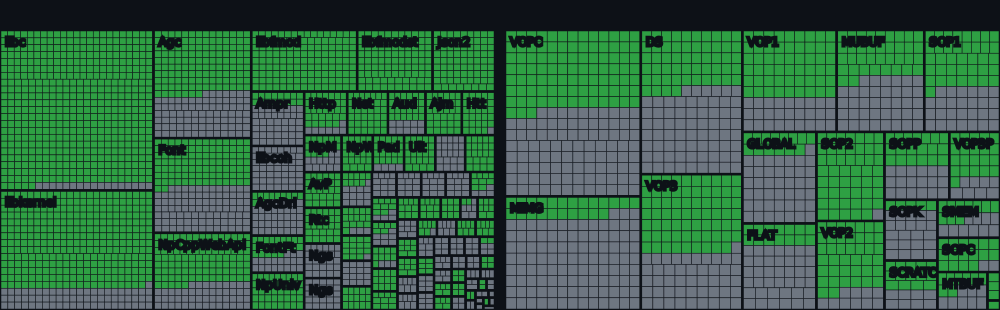
* System libraries: percentage of the functions known to the project so far (declared in core/libs/prx), not of every PS5 system function. The total grows as more functions are declared.
Dreaming Sarah (2D platformer) runs at a stable 60 fps on a GTX 1050 Ti / i5-7500 3.4GHz.
Unsupported or unexpected states strictly throw std::runtime_error. what() is printed to stderr and the process terminates.
The shader recompiler successfully produces SPIR-V (validated via Spirv-Tools when built with ANYPS5_ENABLE_SPIRV_TOOLS).
Compatibility
See the game compatibility list for tested games and known issues.
Input mapping
SDL-mapped game controllers are supported, including analog sticks and triggers. Keyboard and mouse controls can be configured with an anyps5-input.ini file. See input mapping for the supported devices and configuration format.
Disclaimer
This project is intended for interoperability, research, preservation, and compatibility purposes. It does not include, distribute, or require copyrighted software, firmware, cryptographic keys, or proprietary libraries. Users are responsible for ensuring that any binaries used with this project are obtained and used in accordance with applicable laws and their respective license terms.
License
This project is licensed under the GNU General Public License version 2 only.
(Preview — first 8 000 chars. View full README ↗)
📖 README
👁️ Agent Reach
给你的 AI Agent 一键装上互联网能力
当下最稳的接入方式,替你选好、装好、体检好——接入方式会换代,你不用操心



快速开始 · English · 日本語 · 한국어 · 支持平台 · 设计理念
❤️赞助商
点击折叠
 |
BrowserAct 支持从 Amazon、LinkedIn、X、Google Maps 等复杂网站提取你需要的任意数据。你只需用自然语言描述抓取需求,Agent 就会基于真实浏览器自动探索并测试页面流程,生成可靠、可复用的数据采集 Bot,并返回结构化结果。无需手动构建爬虫,无需编写代码。BrowserAct 内置隐身浏览、验证码处理和高质量住宅代理,帮助你更稳定地完成复杂网页数据采集。新用户注册即送 1000 积分,立即免费试用。 |
 |
在腾讯云 Lighthouse 秒级部署 OpenClaw 全能助手,可通过对话丝滑接入 Agent Reach,给你的 OpenClaw 一键装上互联网能力。 |
 |
CoreClaw | 网页抓取平台与现成数据采集工具,CoreClaw 提供 100+ 现成数据采集工具,支持 Amazon、TikTok、Google Maps、Instagram、Facebook、YouTube 等平台,无需代码,支持 JSON/CSV 导出,仅对成功结果计费。免费$3测试! |
 |
优刻得星图astraflow大模型,支持200+模型一键调用:内置 Kimi K3、DeepSeek V4/V3、Qwen 3、GLM5.2、happyhorse等全球领先开源大模型,无需自训,开箱即用 |
为什么需要 Agent Reach?
AI Agent 已经能帮你写代码、改文档、管项目——但你让它去网上找点东西,它就抓瞎了:
- 📺 "帮我看看这个 YouTube 教程讲了什么" → 看不了,拿不到字幕
- 🐦 "帮我搜一下推特上大家怎么评价这个产品" → 搜不了,Twitter API 要付费
- 📖 "去 Reddit 上看看有没有人遇到过同样的 bug" → 403 被封,服务器 IP 被拒
- 📕 "帮我看看小红书上这个品的口碑" → 打不开,必须登录才能看
- 📺 "B站上有个技术视频,帮我总结一下" → 拿不到,通用下载工具被 B站风控全面拦截
- 🔍 "帮我在网上搜一下最新的 LLM 框架对比" → 没有好用的搜索,要么付费要么质量差
- 🌐 "帮我看看这个网页写了啥" → 抓回来一堆 HTML 标签,根本没法读
- 📦 "这个 GitHub 仓库是干嘛的?Issue 里说了什么?" → 能用,但认证配置很麻烦
- 📡 "帮我订阅这几个 RSS 源,有更新告诉我" → 要自己装库写代码
这些不难实现,但是需要自己折腾配置
每个平台都有自己的门槛——要付费的 API、要绕过的封锁、要登录的账号、要清洗的数据。你要一个一个去踩坑、装工具、调配置,光是让 Agent 能读个推特就得折腾半天。
Agent Reach 把这件事变成一句话:
帮我安装 Agent Reach:https://raw.githubusercontent.com/Panniantong/agent-reach/main/docs/install.md
复制给你的 Agent,几分钟后它就能读推特、搜 Reddit、看 YouTube、刷小红书了。
已经装过了?更新也是一句话:
帮我更新 Agent Reach:https://raw.githubusercontent.com/Panniantong/agent-reach/main/docs/update.md
⭐ Star 这个项目,我们会持续追踪各平台的变化、接入新的渠道。你不用自己盯——平台封了我们修,有新渠道我们加。
✅ 在你用之前,你可能想知道
| 💰 完全免费 | 所有工具开源、所有 API 免费。唯一可能花钱的是服务器代理($1/月),本地电脑不需要 |
| 🔒 隐私安全 | Cookie 只存在你本地,不上传不外传。代码完全开源,随时可审查 |
| 🔄 持续换代 | 每个平台都是「首选 + 备选」多后端路由。某个接入方式失效了,我们换下一个,你无感(2026-06 实例:yt-dlp 被 B站风控封死 → 已切换 bili-cli,用户零操作) |
| 🤖 兼容所有 Agent | Claude Code、OpenClaw、Cursor、Windsurf……任何能跑命令行的 Agent 都能用 |
| 🩺 自带诊断 | agent-reach doctor 一条命令告诉你哪个通、哪个不通、怎么修 |
支持的平台
| 平台 | 装好即用 | 配置后解锁 | 怎么配 |
|---|---|---|---|
| 🌐 网页 | 阅读任意网页 | — | 无需配置 |
| 📺 YouTube | 字幕提取 + 视频搜索 | — | 无需配置 |
| 📡 RSS | 阅读任意 RSS/Atom 源 | — | 无需配置 |
| 🔍 全网搜索 | — | 全网语义搜索 | 自动配置(MCP 接入,免费无需 Key) |
| 📦 GitHub | 读公开仓库 + 搜索 | 私有仓库、提 Issue/PR、Fork | 告诉 Agent「帮我登录 GitHub」 |
| 🐦 Twitter/X | 读单条推文 | 搜索推文、浏览时间线、读长文 | 告诉 Agent「帮我配 Twitter」 |
| 📺 B站 | 搜索 + 视频详情(bili-cli,无需登录) | 字幕(OpenCLI) | 告诉 Agent「帮我配 B站」 |
| —(没有零配置路径:匿名接口已被封) | 搜索 + 读帖子和评论 | 桌面装 OpenCLI 用浏览器登录态;或 rdt-cli + Cookie | |
| — | 搜索、主页、Feed、群组列表 | 桌面装 OpenCLI(复用 Chrome 登录态) | |
| — | 用户搜索、Profile、用户最近帖子、Explore | 桌面装 OpenCLI(复用 Chrome 登录态) | |
| 📕 小红书 | — | 搜索、阅读、评论 | OpenCLI 只用用户已有 Chrome 会话;MCP/存量工具用 Cookie-Editor |
| Jina Reader 读公开页面 | Profile 详情、公司页面、职位搜索 | 告诉 Agent「帮我配 LinkedIn」 | |
| 🎯 Boss直聘 | CDP 链路体检 | 搜索岗位 + JD 全文(专用真 Chrome) | 告诉 Agent「帮我配 Boss直聘」;Agent 打开专用 Chrome,你手动登录 |
| 💻 V2EX | 热门帖子、节点帖子、帖子详情+回复、用户信息 | — | 无需配置 |
| 📈 雪球 | 股票行情、搜索股票、热门帖子、热门股票排行 | — | 告诉 Agent「帮我配雪球」 |
| 🎙️ 小宇宙播客 | — | 播客音频转文字(Whisper 转录,免费 Key) | 告诉 Agent「帮我配小宇宙播客」 |
不知道怎么配?不用查文档。 直接告诉 Agent「帮我配 XXX」,它知道需要什么、会一步一步引导你。
🍪 Twitter 只接受用户通过 Cookie-Editor 手工导出的内容。Agent Reach 不替用户执行小红书登录,也不读取小红书浏览器 Cookie;OpenCLI 只使用用户已经存在且明确控制的 Chrome 会话。
agent-reach configure xhs-cookies不会把 Cookie 注入 OpenCLI / Chrome;没有现成会话时,改用 Cookie-Editor 导出后配置 xiaohongshu-mcp / 存量工具。Twitter Cookie 保存后仅供
agent-reach doctor检查配置是否齐全;直接运行上游TWITTER_AUTH_TOKEN和TWITTER_CT0。🔒 Cookie 只存在你本地,不上传不外传。代码完全开源,随时可审查。
💻 本地电脑不需要代理。代理只有部署在服务器上才需要(~$1/月)。
快速上手
⚠️ OpenClaw 用户请先确认 exec 权限已开启
Agent Reach 依赖 Agent 执行 shell 命令(
pip install、mcporter、messaging工具配置,Agent 将无法执行命令。安装前请先开启 exec 权限:
bash
openclaw config set tools.profile "coding"
或在~/.openclaw/openclaw.json中设置"tools": { "profile": "coding" }。
设置后重启 Gateway(openclaw gateway restart)并开启新对话即可。其他平台(Claude Code、Cursor、Windsurf 等)不受此限制。
复制这句话给你的 AI Agent(Claude Code、OpenClaw、Cursor 等):
帮我安装 Agent Reach:https://raw.githubusercontent.com/Panniantong/agent-reach/main/docs/install.md
就这一步。Agent 会自己完成剩下的所有事情。
🔄 已安装过? 更新也是一句话:
帮我更新 Agent Reach:https://raw.githubusercontent.com/Panniantong/agent-reach/main/docs/update.md🛡️ 默认安全:
agent-reach install默认只检查环境,不会自动装系统包或写入配置:
帮我安全检查并安装 Agent Reach:https://raw.githubusercontent.com/Panniantong/agent-reach/main/docs/install.md
只有在你明确允许修改系统后,才使用agent-reach install --system。
它会做什么?(点击展开)
1. **安装 CLI 工具** — 从本仓库安装 `agent-reach` 命令行(自带 yt-dlp、feedparser;不要从 PyPI 安装同名包,它不是本项目) 2. **检查系统基建** — 检查 Node.js、gh CLI、mcporter,并给出缺失项的安装方式 3. **按授权安装与配置** — 仅在显式传入 `--system` 时安装依赖并通过 MCP 接入 Exa 4. **检测环境** — 判断是本地电脑还是服务器,给出对应的配置建议 5. **按授权注册 SKILL.md** — 仅在显式 `--system` 时写入 Agent 的 skills 目录;默认检查不改文件 6. **问你要不要更多** — 默认只激活 6 个零配置渠道;小红书、Twitter、Reddit、Facebook、Instagram 这些需要登录态的,Agent 会列菜单问你要哪些,点名才装 安装完之后,`agent-reach doctor` 一条命令告诉你每个渠道的状态、当前走哪条路。装好就能用
不需要任何配置,告诉 Agent 就行:
- "帮我看看这个链接" →
curl https://r.jina.ai/URL读任意网页 - "这个 GitHub 仓库是做什么的" → `gh repo view own
(Preview — first 8 000 chars. View full README ↗)
📖 README

Monty the Clapper — the official mascot of OpenMontage
OpenMontage
The first open-source, agentic video production system.

Paste A Video · Quick Start · Try These Prompts · Pipelines · How It Works · Sponsors · Providers · Review Guide · Agent Guide


Follow The Build



Sponsors
Want to support OpenMontage? Sponsor the project.
Click to collapse
 |
Bloome lets multiple AI agents (Claude, ChatGPT, DeepSeek, and more) collaborate in one conversation for agentic video pipelines. It has zero setup, runs in the cloud, works on web and mobile, and lets you share a configured agent with your whole team. Try Bloome. |
 |
Atlas Cloud is a full-modal AI inference platform that gives developers a single AI API for video generation, image generation, and LLM APIs. Instead of managing multiple vendor integrations, you connect once and get unified access to 300+ curated models across all modalities. Check out Atlas Cloud's new coding plan promotion for more budget-friendly API access. |
Turn your AI coding assistant into a full video production studio. Describe what you want in plain language — your agent handles research, scripting, asset generation, editing, and final composition.
Important distinction: OpenMontage can make image-based videos, but it can also make a real video video for free/open-source workflows: the agent builds a corpus from free stock footage and open archives, retrieves actual motion clips, edits them into a timeline, and renders a finished piece. That is not the usual "animate a handful of stills and call it video" trick.
"SIGNAL FROM TOMORROW" — a cinematic sci-fi trailer fully produced through OpenMontage: concept, script, scene plan, Veo-generated motion clips, soundtrack, and Remotion composition.
"THE LAST BANANA" — a 60-second Pixar-style animated short about a lonely banana who finds friendship with a kiwi. 6 Kling v3-generated motion clips (via fal.ai), Google Chirp3-HD narration, royalty-free piano music, TikTok-style word-level captions, and Remotion composition. Total cost: $1.33.
"OBJECTS IN OVERDRIVE" — a 54-second, music-driven 3D showcase featuring ten objects with distinct choreography: gravity-shifting furniture, frozen car drifts, cloth impacts, refractive lenses, moving gears, an acrobatic robot, and more. Custom Blender animation and physics, kinetic typography, and a phonk soundtrack. Rendered with Blender Eevee/Cycles and assembled with FFmpeg. No narration.
"Reimagine Your Universe" — a 50-second vertical transformation film in which one visual idea moves across objects, eras, materials, and scale. Five generated motion scenes, sparse Google Chirp narration, a Pixabay score, and a bespoke HyperFrames composition turn separate clips into one authored cinematic journey. Total cost: about $4.
"Products Come to Life" — a 60-second product film built from approved hero stills. Five hard-surface products separate into their own engineering and reassemble, with each still pinned as the first and last frame so the model invents motion without losing product identity. Image-to-video generation, bespoke sound, narration, and a custom composition complete the film.
"Imagine the Possibilities with OpenMontage" — seven generated worlds collected into one music-only showcase. Three image models supply campaign, fashion, and miniature-world artwork; four video models expand the journey through architecture, material transformation, a living greenhouse, and a creature encounter. OpenMontage animates the stills, edits the motion, unifies the soundtrack, and closes with Monty the Clapper. Source generation cost: about $5.
"How Salt Made History" — a 100-second cinematic documentary about the mineral that funded empires, shaped trade routes, sparked revolutions, and gave us the word “salary.” Real-world footage is woven together with original narration and hand-authored motion graphics for its etched title, etymology reveal, animated maps, historical timeline, and closing thesis.
📖 README
a  project
Every site on HTTPS
Caddy is an extensible server platform that uses TLS by default.
Releases · Documentation · Get Help






Powered by

Special thanks to:
Menu
Features
- Easy configuration with the Caddyfile
- Powerful configuration with its native JSON config
- Dynamic configuration with the JSON API
- Config adapters if you don't like JSON
- Automatic HTTPS by default
- ZeroSSL and Let's Encrypt for public names
- Fully-managed local CA for internal names & IPs
- Can coordinate with other Caddy instances in a cluster
- Multi-issuer fallback
- Encrypted ClientHello (ECH) support
- Stays up when other servers go down due to TLS/OCSP/certificate-related issues
- Production-ready after serving trillions of requests and managing millions of TLS certificates
- Scales to hundreds of thousands of sites as proven in production
- HTTP/1.1, HTTP/2, and HTTP/3 all supported by default
- Highly extensible modular architecture lets Caddy do anything without bloat
- Runs anywhere with no external dependencies (not even libc)
- Written in Go, a language with higher memory safety guarantees than other servers
- Actually fun to use
- So much more to discover
Install
The simplest, cross-platform way to get started is to download Caddy from GitHub Releases and place the executable file in your PATH.
See our online documentation for other install instructions.
Build from source
Requirements:
For development
Note: These steps will not embed proper version information. For that, please follow the instructions in the next section.
$ git clone "https://github.com/caddyserver/caddy.git"
$ cd caddy/cmd/caddy/
$ go build
When you run Caddy, it may try to bind to low ports unless otherwise specified in your config. If your OS requires elevated privileges for this, you will need to give your new binary permission to do so. On Linux, this can be done easily with: sudo setcap cap_net_bind_service=+ep ./caddy
If you prefer to use go run which only creates temporary binaries, you can still do this with the included setcap.sh like so:
$ go run -exec ./setcap.sh main.go
If you don't want to type your password for setcap, use sudo visudo to edit your sudoers file and allow your user account to run that command without a password, for example:
username ALL=(ALL:ALL) NOPASSWD: /usr/sbin/setcap
replacing username with your actual username. Please be careful and only do this if you know what you are doing! We are only qualified to document how to use Caddy, not Go tooling or your computer, and we are providing these instructions for convenience only; please learn how to use your own computer at your own risk and make any needful adjustments.
Then you can run the tests in all modules or a specific one:
$ go test ./...
$ go test ./modules/caddyhttp/tracing/
With version information and/or plugins
Using our builder tool, xcaddy...
$ xcaddy build
...the following steps are automated:
- Create a new folder:
mkdir caddy - Change into it:
cd caddy - Copy Caddy's main.go into the empty folder. Add imports for any custom plugins you want to add.
- Initialize a Go module:
go mod init caddy - (Optional) Pin Caddy version:
go get github.com/caddyserver/caddy/v2@versionreplacingversionwith a git tag, commit, or branch name. - (Optional) Add plugins by adding their import:
_ "import/path/here" - Compile:
go build -tags=nobadger,nomysql,nopgx
Quick start
The Caddy website has documentation that includes tutorials, quick-start guides, reference, and more.
**We recommend that all users -- regardless of experience level -- do our Getting Started guide to become
(Preview — first 8 000 chars. View full README ↗)
📖 README
 **A self-hosted gym and body-weight tracker you actually own.**
Plan your week, run guided workouts, log every set and your body weight —
**A self-hosted gym and body-weight tracker you actually own.**
Plan your week, run guided workouts, log every set and your body weight —on your phone, synced across your devices, behind your own passkey login. [](https://discord.gg/e62jY6fwVb) [](https://discord.gg/e62jY6fwVb) [](https://github.com/DuarteSantos8/openGym/stargazers) [](https://github.com/DuarteSantos8/openGym/releases) [](https://github.com/DuarteSantos8/openGym/actions/workflows/test.yml) [](https://gitlab.com/DuarteSantos8/opengym/-/pipelines) [](https://gitlab.com/DuarteSantos8/opengym/-/pipelines?ref=main) [](LICENSE) [Website](https://opengym.duarte-santos.ch) · [Live demo](https://opengym.duarte-santos.ch/demo/) · [Android APK](https://github.com/DuarteSantos8/openGym/releases/latest) · [Self-hosting guide](docs/SELF_HOSTING.md) · [Roadmap](ROADMAP.md) · [Changelog](CHANGELOG.md)
 Home · today's workout and weight |
 Guided workout · demos and sets |
 Stats · heatmap, charts and PRs |
Why openGym
Most workout apps keep your data on their servers, push you towards a subscription, or vanish
when the company does. openGym runs on your own box, keeps your data in a folder you control, and
is yours to fork. It still behaves like a modern app: installable on the home screen, passkey
sign-in, works offline, syncs between your phone and your laptop.
No account on someone else's server, no subscription, no ads, no telemetry. One
docker compose up and it's running.
The in-browser demo is the real app with example data,
if you want to try it before installing anything.
Features
Planning
- A routine per weekday over a library of 1,324 exercises with animated demos, searchable and
browsable by muscle on a body map. Filter by the equipment you own. - Four starter plans (Push/Pull/Legs, Upper/Lower, Full Body, 5×5) that load as ordinary,
editable routines. - Move a session to another day without touching the weekly plan. The week starts on Monday or
Sunday, your choice. - Supersets, warm-up sets, drop sets and rest-pause, timed exercises (planks, hangs, carries),
cardio by time and speed, rest time per exercise, planned deloads. - Your own exercises, with your own photo, GIF or short video. Location data is stripped on the
device before upload.
Training
- Guided sessions: today's workout starts itself, weights are pre-filled from last time, a rest
timer runs between sets, PRs are detected as you go. On a rest day it tells you when the next
session is. - A quiet workout screen: one menu per exercise, the set number as the set's own menu, card or
list view. Switches in Settings bring the old button rows back if you liked them. - Optional effort column as RIR or RPE, colour-coded, with a plain-language line per level.
- Plate math for barbell, EZ bar, trap bar and Smith machine, worked out from the plates you own.
- Bodyweight exercises know they carry no load: log reps, add a dip belt if you use one.
- Per-side reps for lunges and single-arm work, the screen stays awake while you train, and a
rest-timer alert can flash the screen for loud gyms.
Progress
- Progression rules per routine or per exercise: linear, Greyskull LP, double progression through a
visible rep range, or adding time. Each target explains why it is that number; missed reps never
add load, stalls trigger a deload. - Estimated 1RM per exercise with its own curve, Structural Balance ratios (Poliquin, Thibaudeau,
ATG), a year-long activity heatmap. - A muscle map in three modes: where your volume went, what is still recovering, and what has gone
untrained. - Body-weight chart against a goal line.
- Edit any saved workout after the fact, log one you did on paper, or move it to the right date.
Records are re-read from the corrected history.
Accounts and data
- Passkeys (Face ID, Touch ID, fingerprint) with per-profile data synced across devices. Password
sign-in can be switched on per instance; new devices pair with a one-time code or QR. - Two devices editing at once merge instead of overwriting each other (see sync).
- Import from FitNotes, Strong, Hevy (CSV or API key) and Apple Health weight exports. Export
everything as one JSON file whenever you like. - Share a plan as a small file or print it as a PDF.
- Optional admin dashboard with invite-only signup and an activity log.
- 17 languages, including right-to-left Arabic. Exercise names and instructions are translated
for most of them.
Optional extras, off by default
- An AI coach that drafts a week of routines and later suggests changes based on
what you logged. You approve every change. It runs on your server with your own provider key
(Anthropic, OpenAI, Gemini or any OpenAI-compatible endpoint, Ollama included). - An MCP server so an assistant like Claude Desktop can answer questions about your
training history. Read-only and local; not part of the Docker build.
The full list of what changed release by release is in the changelog.
Quick start
You need Docker with Compose.
git clone https://github.com/DuarteSantos8/openGym
cd openGym
cp .env.example .env
docker compose pull      # prebuilt images, amd64 + arm64 (skip this to build from source)
docker compose up -d
Open http://localhost:8080, tap Create profile, and you're in. The first start downloads
the exercise media (about 140 MB) once.
To reach it from your phone with passkeys you need HTTPS on a domain; that's a two-line change in
.env. The self-hosting guide walks through Cloudflare Tunnel, Caddy,
Traefik and nginx, and there are separate guides for
HTTPS on a LAN and Kubernetes.
[!NOTE]
Images are published from the same tag toregistry.gitlab.com/duartesantos8/opengym/{api,web}
(whatdocker-compose.ymlpulls) andghcr.io/duartesantos8/opengym-{api,web}. Swap the
image:lines if you prefer GHCR, or rundocker compose up -d --buildto build locally. Either
way you don't need Node on the host.
Configuration reference (all through .env)
| Variable | What it does |
(Preview — first 8 000 chars. View full README ↗)
📖 README
Cloudflare OS: An AI productivity environment
Cloudflare OS is an "operating system" for AI productivity originally developed for use inside Cloudflare. A large portion of Cloudflare's workforce -- from engineering to sales and everything in between -- uses Cloudflare OS every day to help them do their jobs.

This is not a traditional computer operating system. We use the term "operating system" in two senses:
- An operating system for the company to be productive with AI, in a way that is safe, so that the security team can sleep at night.
- An operating system for AI workloads, analogous to the sense in which a traditional operating system manages compute workloads.
Cloudflare OS provides three things in particular:
- An agent chat UI where you can ask agents to do tasks, preloaded with knowledge about how your company operates.
- Sandboxed application development, so that you can ask agents to build "gadgets" (small personal apps) and safely share what you've built with others.
- A security framework, called Gatekeepers, that applies guardrails to both agents and apps such that non-technical users can safely "go nuts" and nothing bad will happen.
We are making Cloudflare OS open source so that others can copy it and customize it for their own company. The idea is not that your company uses Cloudflare OS, but rather that you make it "Your Company OS".
Quick Start
To quickly run Cloudflare OS locally, install pnpm, then do:
pnpm run-local
Then visit: http://localhost:8787
This runs the whole stack locally on wrangler and workerd. This is not meant for production use, but is a quick way to see what the product does.
Alternatively, you can deploy to your Cloudflare account.
(More options at the end of this readme.)
What to try
Try prompts like:
- "Make slides for my upcoming meeting with a customer." (This will use the built-in slides blueprint.)
- "Make a collaborative whiteboard app." (This will create a new app from scratch.)
- "Make a tic tac toe game." followed by "I'll be X and you be O. I've made my first move. Your turn."
- "Make an issue dashboard for this GitHub repo." (Attach a repo; requires that the GitHub integration is configured.)
- "Fix the typos in this Google Doc." (Attach a doc; requires that the Google integration is configured.)
WARNING: Early access
Cloudflare OS is in a state of heavy development. This repository is actually version 2, a complete rewrite taking what we learned from version 1 and putting it on a new foundation.
As of the August 2026 release, Cloudflare OS v2 is very capable, but still has many rough edges. We know, and we're working on it. For now, consider this an "early access" release.
Overview: What is Cloudflare OS really?
Gadgets: A new way of thinking about software
Cloudflare OS is more than just another chatbox with connectors. The system revolves around a new approach to software, where every user runs their own copy of the productivity apps they use.
When you create a slide deck in Cloudflare OS, you are not calling out to some SaaS software running in the cloud. The system creates a private instance of the slide deck software just for you. We call this a "gadget". This instance runs in a separate sandbox from everyone else's slide decks.
This has two profound effects:
1. It's impossible for the slide deck app to have a security bug that leaks your slides to an attacker. The Cloudflare OS sandbox controls all access to your private instance of the app.
2. If you want, you can freely modify the code. If the slide deck app is missing a feature you need, you can just ask your agent to add it. And because of point 1, it's totally safe to do so.
This is a big departure from the last 25 years of cloud architecture and "Software as a Service", but we think AI has changed the equation. When any user is capable of prompting an agent to add the features they need, the centralized model of software stops making sense.
Gatekeepers: A capability-based security layer
Gatekeepers are like supercharged MCP servers.
When you introduce an agent or Gadget to an external resource, a Gatekeeper is created to manage that access. The Gatekeeper is a piece of software specific to each external service which moderates a Gadget's connection to that service. It:
* Provides a clean Cap'n Web API to the service (wrapping whatever API the service provides natively).
* Handles authorization (e.g. via OAuth).
* Enforces narrow access to only the specific resource the user intended.
* Logs every action the Gadget (or agent) performs, for your review.
* For any action which has side effects, provides the human user an opportunity to approve or deny the action ("human in the loop").
On the last point, Gatekeepers implement a significant advancement in the state of the art. Traditionally, human-in-the-loop setups require the human to approve actions synchronously. When the agent wants to do something, it has to stop and wait for said approval before it can continue. This is annoying: you give your agent a task, then walk away and get a coffee, only to come back and find the agent got stuck on an approval on the first step and has made no progress. As a result, people often give in and set their agents to "auto-approve", or --dangerously-skip-permissions, which is, obviously, unsafe.
Gatekeepers provide a better way: When the agent (or Gadget) performs an action that requires approval, the Gatekeeper will simulate the outcome locally, allowing the agent to proceed and queue up more actions. The Gatekeeper tells the agent that the action completed, and if the agent tries to read back the results, the Gatekeeper gives it simulated results. Once the agent is done, the user may approve or reject the actions in bulk, or one-by-one, but either way, they can do it later, when it is convenient.
Logistically, each Gatekeeper is implemented as a separate Worker. In the future, we envision Gatekeeper services being deployed and maintained independently from OS instances, but the details have yet to be worked out. For now, we have provided a few interesting Gatekeepers in this repository which you can deploy together with your own OS instance.
Think of an office suite
The basic user experience of Cloudflare OS is something like an online office suite, like Google Docs or MS Office. But, imagine that instead of a fixed set of file types (document, spreadsheet, slide deck), each file -- or "Gadget" -- is potentially its own custom application, written by AI to serve exactly your needs.
Just like office docs, each gadget is private by default, but can be shared -- securely -- in order to collaborate with your team or your friends.
Just like office docs, you can have thousands of them. You can create them on a whim.
Just like office docs, you can start from "templates" -- called "Blueprints". But where an office template is just some content, a Blueprint specifies a whole application.
Like office docs, you can create new templates (blueprints) from your own docs (Gadgets) and share them with others. But when you do so, you are sharing the code for a whole app.
It kind of is an Operating System
The OS terminology isn't entirely marketing. Cloudflare OS is actually analogous to an operating system on a technical level.
| Normal OS | Cloudflare OS |
|---|---|
| kernel | packages/workshop-backend |
| device drivers | packages/gatekeeper-* |
| shell | packages/workshop-frontend |
| processes | gadgets |
| executables | blueprints |
| users | users |
| ACLs | shared permissions |
| ??? | agents |
(Preview — first 8 000 chars. View full README ↗)
📖 README
Stremio - Freedom to Stream

Stremio is a modern media center that's a one-stop solution for your video entertainment. You discover, watch and organize video content from easy to install addons.
Build
Prerequisites
- Node.js 12 or higher
- npm 6 or higher
Install dependencies
npm install
Start development server
npm start
Production build
npm run build
Screenshots
Board

Discover

Meta Details

License
Stremio is copyright 2017-2022 Smart code and available under GPLv2 license. See the LICENSE file in the project for more information.
(Preview — first 8 000 chars. View full README ↗)
📖 README
🎭 The Agency: AI Specialists Ready to Transform Your Workflow
A complete AI agency at your fingertips - From frontend wizards to Reddit community ninjas, from whimsy injectors to reality checkers. Each agent is a specialized expert with personality, processes, and proven deliverables.



🆕 There's an app now
Agency Agents is a native app for macOS, Linux & Windows that browses the entire roster and installs it into Claude Code, Cursor, Codex, Gemini, Osaurus, and more — with a click. No clone, no scripts, and it auto-updates.
🚀 What Is This?
Born from a Reddit thread and months of iteration, The Agency is a growing collection of meticulously crafted AI agent personalities. Each agent is:
- 🎯 Specialized: Deep expertise in their domain (not generic prompt templates)
- 🧠 Personality-Driven: Unique voice, communication style, and approach
- 📋 Deliverable-Focused: Real code, processes, and measurable outcomes
- ✅ Production-Ready: Battle-tested workflows and success metrics
Think of it as: Assembling your dream team, except they're AI specialists who never sleep, never complain, and always deliver.
⚡ Quick Start
Option 1: Install the app (Recommended)
The fastest way in — no clone, no terminal. Agency Agents is a native desktop app (macOS · Linux · Windows) that browses the whole roster and installs agents into Claude Code, Cursor, Codex, Gemini CLI, OpenCode, Qwen, and Osaurus for you, then keeps them up to date.
⬇ Download the latest release — or on a Mac:
brew install --cask msitarzewski/agency-agents/agency-agents
Prefer the command line? The script-based options below install the same agents.
Option 2: Use with Claude Code
# Install all agents to your Claude Code directory
./scripts/install.sh --tool claude-code

# Or manually copy a category if you only want one division
cp engineering/*.md ~/.claude/agents/

# Then activate any agent in your Claude Code sessions:
# "Hey Claude, activate Frontend Developer mode and help me build a React component"
Option 3: Use as Reference
Each agent file contains:
- Identity & personality traits
- Core mission & workflows
- Technical deliverables with code examples
- Success metrics & communication style
Browse the agents below and copy/adapt the ones you need!
Option 4: Use with Other Tools (GitHub Copilot, Antigravity, Gemini CLI, OpenCode, OpenClaw, Cursor, Aider, Windsurf, Kimi Code, Codex, Osaurus, Hermes, Mistral Vibe, DeepSeek Harness)
# Step 1 -- generate integration files for all supported tools
./scripts/convert.sh

# Step 2 -- install interactively (auto-detects what you have installed)
./scripts/install.sh

# Or target a specific tool directly
./scripts/install.sh --tool antigravity
./scripts/install.sh --tool gemini-cli
./scripts/install.sh --tool opencode
./scripts/install.sh --tool copilot
./scripts/install.sh --tool openclaw
./scripts/install.sh --tool cursor
./scripts/install.sh --tool aider
./scripts/install.sh --tool windsurf
./scripts/install.sh --tool kimi
./scripts/install.sh --tool codex
./scripts/install.sh --tool osaurus
./scripts/install.sh --tool hermes
./scripts/install.sh --tool vibe
./scripts/install.sh --tool dsh
Install only the teams you need (not everyone wants every division):
./scripts/install.sh                                    # interactive wizard: pick tools + teams
./scripts/install.sh --tool claude-code --division engineering,security
./scripts/install.sh --tool cursor --agent frontend-developer,ui-designer
./scripts/install.sh --list teams                       # see every team + agent count
./scripts/install.sh --tool opencode --division engineering --dry-run
--agent and --agents-file take an agent's slug (as --list agents prints it), its display name, or its file name without .md — the id the runbook rosters use — so a runbook's team installs as listed:
python3 -c 'import json, sys
for r in json.load(open("strategy/runbooks.json"))["runbooks"]:
    if r["slug"] == sys.argv[1]: [print(a) for g in r["roster"] for a in g["agents"]]' startup-mvp > team.txt
./scripts/install.sh --tool claude-code --agents-file team.txt
OpenCode note: OpenCode's runtime currently registers only ~119 agents and silently drops the rest (upstream bug). Installing a subset with
--divisionkeeps you under that limit. The installer warns you when a selection would exceed it.
See the Multi-Tool Integrations section below for full details.
🎨 The Agency Roster
💻 Engineering Division
Building the future, one commit at a time.
| Agent | Specialty | When to Use |
|---|---|---|
| 🎨 Frontend Developer | React/Vue/Angular, UI implementation, performance | Modern web apps, pixel-perfect UIs, Core Web Vitals optimization |
| 🏗️ Backend Architect | API design, database architecture, scalability | Server-side systems, microservices, cloud infrastructure |
| 📱 Mobile App Builder | iOS/Android, React Native, Flutter | Native and cross-platform mobile applications |
| 🤖 AI Engineer | ML models, deployment, AI integration | Machine learning features, data pipelines, AI-powered apps |
| 🚀 DevOps Automator | CI/CD, infrastructure automation, cloud ops | Pipeline development, deployment automation, monitoring |
| 🌐 Network Engineer | Cisco IOS/IOS-XE, Juniper Junos, Palo Alto PAN-OS | Router/switch/firewall configuration, BGP/OSPF, ACLs, show-output troubleshooting |
| ⚡ Rapid Prototyper | Fast POC development, MVPs | Quick proof-of-concepts, hackathon projects, fast iteration |
| 💎 Senior Developer | Laravel/Livewire, advanced patterns | Complex implementations, architecture decisions |
| 🔧 Filament Optimization Specialist | Filament PHP admin UX, structural form redesign, resource optimization | Restructuring Filament resources/forms/tables for faster, cleaner admin workflows |
| ⚡ Autonomous Optimization Architect | LLM routing, cost optimization, shadow testing | Autonomous systems needing intelligent API selection and cost guardrails |
| 🔩 Embedded Firmware Engineer | Bare-metal, RTOS, ESP32/STM32/Nordic firmware | Production-grade embedded systems and IoT devices |
| 🚨 Incident Response Commander | Incident management, post-mortems, on-ca |
(Preview — first 8 000 chars. View full README ↗)
📖 README
esp32-c3-adblock
A Pi-hole-style DNS ad-blocker that runs on a $2 ESP32-C3 — no PSRAM required.
📰 Featured on Tom's Hardware, XDA Developers, and Korben.
The trick everyone misses: you don't need to keep the blocklist in RAM. Store the
domains as sorted 40-bit hashes in flash and binary-search them. 140,000+ domains
fit in ~0.7 MB of flash and are matched in ~10 ms, using ~50 KB of RAM.
query in ──▶ extract domain ──▶ FNV-1a hash (+ parent suffixes)
         ──▶ binary-search the flash hash table
              ├─ hit  ──▶ answer 0.0.0.0   (sinkholed)
              └─ miss ──▶ forward to upstream resolver, relay the reply
Why this is interesting
Most ESP32 DNS sinkholes load the blocklist (domain strings) into RAM, so they
demand PSRAM. This project stores fixed 5-byte (40-bit) hashes in flash instead:
| string-in-RAM approach | this (hash-in-flash) | |
|---|---|---|
| Hardware | ESP32 + PSRAM (~$8) | ESP32-C3, no PSRAM (~$2) |
| 141k domains | ~2.5 MB of RAM | 0.67 MB of flash |
| RAM used | most of it | ~50 KB |
| Lookup | string compare | ~18 flash reads (~10 ms incl. WiFi RTT) |
| Collisions | n/a | 0 at 141k (1 at 537k) |
Why 40 bits? It's the sweet spot for this flash budget. Collisions follow the
birthday bound — at 141k domains you get ~0, at 537k about 1 (i.e. one unlucky
domain gets over-blocked). Dropping to 32 bits would save 20% of the flash but
cost ~7 collisions at 250k; going to 64 bits wastes 3 bytes per domain to solve
a problem you don't have.
The same trick works on bigger chips — it isn't a C3 workaround. On a 16 MB
ESP32-S3 these hashes hold ~2.7M domains vs ~466k for strings in 8 MB of
PSRAM. Hashes in flash beat strings in PSRAM basically everywhere; the C3 just
makes it undeniable.
Hardware
- Any ESP32-C3 board (tested on a C3 SuperMini), 4 MB flash, no PSRAM needed
- Classic ESP32 (DevKit / WROOM, 4 MB) also builds:
pio run -e esp32dev -t upload(community-contributed, compile-tested; the C3 is the tested target) - Power it from a stable USB source (a phone charger or your router's USB port).
Cheap/loose USB-C→A adapters can brown out the radio during WiFi transmit. - A USB-A → USB-C dongle lets it plug straight into the spare USB port on the
back of most routers — no power supply, no extra box.
Enclosure
A printable case for the C3 SuperMini: hardware/esp32-c3-supermini-enclosure.stl
Printing notes:
- No supports needed; 0.2 mm layers, ~15% infill is plenty.
- Keep the antenna end clear. The C3's PCB antenna is the zig-zag trace on the
short edge opposite the USB-C port — don't bury it in solid plastic or put metal
near it, or your RSSI will suffer.
- Leave the vents open: the board idles around 45–55 °C.
Build & flash (PlatformIO)
One USB flash to get going — after that, firmware and blocklist both update over WiFi (see below).
⚠️ Use a current PlatformIO — the VSCode PlatformIO extension's bundled core, or
pip install -U platformioin a venv. The distro/aptplatformiopackage (e.g. 4.3.4) is
too old and fails withAttributeError: ... 'resultcallback'(issue #4). A one-click browser installer is on the way (hosting TBD).
# 1. copy the secrets template (gitignored, stays local) and edit it:
#    - WIFI_SSID / WIFI_PASS are optional — leave the placeholders and use the
#      on-device setup portal instead (below).
#    - WEB_USER / WEB_PASS / OTA_PASS are NOT optional: they gate the dashboard's
#      state-changing endpoints (/ban, /addblock, /upload, /update, /setupdate,
#      /forgetwifi) and network OTA. Pick real values — these used to be wide
#      open to anyone on the LAN.
cp src/secrets.example.h src/secrets.h
#    then edit src/secrets.h

# 2. build the blocklist hash table (default = StevenBlack base + Hagezi Light,
#    ~100k entries, WhatsApp/social safe)
python3 tools/build_blocklist.py data/blocklist.bin

# 3. flash firmware + the blocklist filesystem (the one and only USB flash)
pio run -t upload
pio run -t uploadfs

# 4. watch it boot, note the IP / open the dashboard
pio device monitor          # -> http://c3adblock.local
Your own blocklists
build_blocklist.py OUT.bin [SOURCE ...] takes any mix of URLs and local files, in any of
these formats:
- hosts files —
0.0.0.0 ads.example.com - plain domain lists — one domain per line
- AdGuard / Adblock basic rules —
||ads.example.com^blocks,@@||ok.example.com^
removes a domain (e.g. to mirror an AdGuard Home allowlist)
A blocked domain also blocks its subdomains. Rules a DNS hash list can't express (regex,
wildcards, $ modifiers, cosmetic ## rules) are skipped and counted. An @@ rule only
un-blocks that exact entry — it can't carve a subdomain out of a blocked parent. If a source
can't be downloaded the build stops instead of silently producing a smaller list
(--allow-missing to override).
WiFi setup (no re-flash needed)
If it can't connect (or you never set secrets.h), it starts an open access point
C3-AdBlock-XXXX with a captive portal — join it from a phone, pick your network,
type the password, done. To move it to a new network later: click Forget WiFi on
the dashboard, or hold the BOOT button while powering on, and the setup portal
comes back. (/forgetwifi requires auth now, so it's no longer a bare URL you can
just visit — see Security below.)
Over-the-air updates (no more USB)
The dashboard at http://c3adblock.local does it all:
- Blocklist — drop a freshly built
blocklist.bininto Blocklist → Upload, or set a
URL under Remote auto-update and the device pulls a prebuiltblocklist.bin
on a schedule. A fresh default list is rebuilt every Monday by GitHub Actions and
published at a stable URL, so pasting this once keeps a device current on its own:
https://github.com/M-Abozaid/esp32-c3-adblock/releases/download/blocklist/blocklist.bin - Firmware — upload
.pio/build/c3/firmware.binunder Firmware → OTA update; the
device verifies it and reboots into the new image. Or push over WiFi from the CLI:
bash
  pio run -t upload --upload-port c3adblock.local --upload-protocol espota
4 MB flash tradeoff: firmware OTA needs two app slots, which leaves ~1.3 MB for the
blocklist (~250k domains max). The aggressive 537k "ultimate" list only fits the
single-app partition table (no firmware OTA). Pick your tradeoff in partitions.csv.
Security
The dashboard's read-only view (/, /stats.json) stays open, but every
state-changing endpoint requires HTTP Basic Auth (WEB_USER/WEB_PASS from
secrets.h):
/ban,/addblock,/unblock,/forgetwifi/upload,/update(blocklist and firmware OTA)/setupdate,/fetchnow
Network OTA (ArduinoOTA, e.g. pio run -t upload --upload-port c3adblock.local
--upload-protocol espota) requires OTA_PASS from the same file.
Without this, anyone who could reach the device on the LAN could reflash it
with arbitrary firmware or rewrite the blocklist with zero credentials — worth
knowing given the device sits in the path of every DNS query on your network.
Custom blocked-domain names are also HTML-escaped before being rendered on the
dashboard, closing a stored-XSS path where a domain string containing markup
(added via /addblock) would otherwise execute in the viewing browser.
Basic Auth here is a LAN-trust-boundary control, not encryption. Everything
is plain HTTP on
(Preview — first 8 000 chars. View full README ↗)